How to Secure Your Zoom Video Chats and Meetings
Welcome To Zoom
Zoom is now a popular videoconferencing cloud chat application used by millions of people worldwide to correspond with each other globally. It had gained popularity due to the Corona Virus outbreak in the late 2019's. This was because most governments of the world gave stay at home orders and many business establishments and all schools were closed. Learning had to be done via remote access and also many workers worked from home and held videoconferencing meetings. But whenever there is massive rush to use an application, then there lies the security concerns. This is due t the fact that the Zoom application was not that secured as it was not a popular usage application. As a matter of fact, the word zoom only resounded when persons were magnifying an image or some text. Many people have experienced something called Zoom Bombing. Let's talk about the Zoom Bombing a little more in the next Paragraph.

Zoom Bombing
Fortunately, Zoom bombing is nothing like a world war one or two type of scenario. So let us say that you have setup a meeting using zoom. You have sent out your meeting ID and password for the authorized guest. Then Wham! Right in the middle of the meeting some strange guy joins dresses as a half naked Santa Claus and begins to clown out the meeting. This is basically what Zoom bombing is. It is when someone gets unauthorized access to your meeting and joins the meeting and creates chaos.
Prevent Zoom Bombing Tips
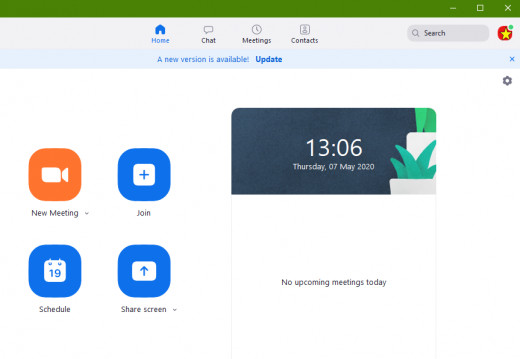
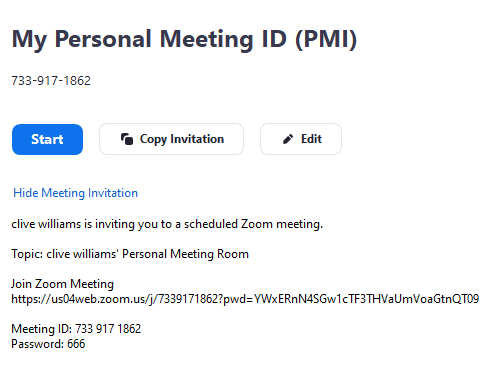
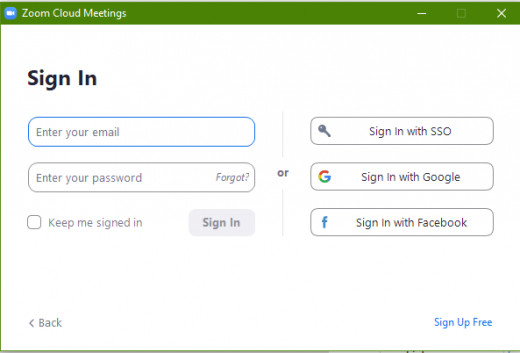
When you log into Zoom, you can either host a meeting or join a meeting. When you decide to host a meeting, you simply select start a meeting and follow the simple steps in doing so. All zoom accounts have a Personal Meeting ID (PMI). If you are using the free Zoom version, this meeting ID cannot be changed and is fixed to your free account. If you are using the paid for Zoom account, you can change your PMI. So once you schedule a conference meeting, a link is automatically created for you in zoom. This link is what people email out to participants to join the meeting. So here are a few ways to secure this link and minimize zoom bombing.
- Always create a zoom meeting password. If you create an open meeting without a password, anyone with just the meeting link can join your meeting and become a zoom espionage. A password creates an extra level of security for zoom meetings.
- Create a Zoom meeting group and add the authorized recipients. Double check the email names to ensure that they are correct and only authorized emails are in your zoom email group. Use this group to send out your zoom meeting invites.
- Don't reuse your zoom meeting passwords for every meeting. Change the zoom meeting password for every meeting that you host.
- Don't create your meeting until at least an hour before the meeting begins. Just give the participants a heads up by email or messaging that a meeting is scheduled and the time of such.
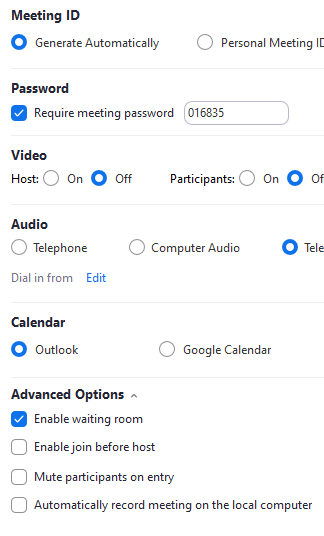
- Don't enable Join Before Host option. You are the host and must see and controls who joins the meeting.
- Always know how much person is suppose to be in the meeting. So if you send out an invite to 20 people and you notice 22 people on. Ask the clients to log off any extra device. Close the meeting and send out a new meeting link with a new password.
- Disallow Screen Sharing - This allows the host and participants to share their screens during a zoom meeting. You can either completely disable this or allow only the host of the meeting to share his or her screen. By disabling screen sharing, you prevent someone from sharing inappropriate content during the meeting. But this does not block them from walking in their birthday suites across the camera.
- Disable Allow Participants to Rename Themselves: If a Zoom bomber doesn’t have access to the chatroom, they can get their message across by typing it as their name. Disable this to remove that option.
ARTSAUTOSBOOKSBUSINESSEDUCATIONENTERTAINMENTFAMILYFASHIONFOODGAMESGENDERHEALTHHOLIDAYSHOMEHUBPAGESPERSONAL FINANCEPETSPOLITICSRELIGIONSPORTSTECHNOLOGYTRAVEL
How to Secure Your Zoom Video Chats and Meetings
Updated on May 7, 2020

Welcome To Zoom
Zoom is now a popular videoconferencing cloud chat application used by millions of people worldwide to correspond with each other globally. It had gained popularity due to the Corona Virus outbreak in the late 2019's. This was because most governments of the world gave stay at home orders and many business establishments and all schools were closed. Learning had to be done via remote access and also many workers worked from home and held videoconferencing meetings. But whenever there is massive rush to use an application, then there lies the security concerns. This is due t the fact that the Zoom application was not that secured as it was not a popular usage application. As a matter of fact, the word zoom only resounded when persons were magnifying an image or some text. Many people have experienced something called Zoom Bombing. Let's talk about the Zoom Bombing a little more in the next Paragraph.
Zoom Bombing
Fortunately, Zoom bombing is nothing like a world war one or two type of scenario. So let us say that you have setup a meeting using zoom. You have sent out your meeting ID and password for the authorized guest. Then Wham! Right in the middle of the meeting some strange guy joins dresses as a half naked Santa Claus and begins to clown out the meeting. This is basically what Zoom bombing is. It is when someone gets unauthorized access to your meeting and joins the meeting and creates chaos.
Zoom Bombing is not really a security flaw in zoom. But it is a security issue. Normally when an authorized access is gained by a 'zbomber' is when the person who sends out the link send the link to someone who shouldn't have received the link in the first place. Then that person may just send that link to the city clown who decides to have a little fun in an executive online meeting.Some zoom meeting links can even be found in some search engines results. This makes it easy for anyone to hop in someones meeting and listen and collect sensitive information or just create mischief. You cannot fully prevent a Zoom bombing as this is most times caused by human error, but I will discuss ways to limit such things from happening to you.
Prevent Zoom Bombing Tips
When you log into Zoom, you can either host a meeting or join a meeting. When you decide to host a meeting, you simply select start a meeting and follow the simple steps in doing so. All zoom accounts have a Personal Meeting ID (PMI). If you are using the free Zoom version, this meeting ID cannot be changed and is fixed to your free account. If you are using the paid for Zoom account, you can change your PMI. So once you schedule a conference meeting, a link is automatically created for you in zoom. This link is what people email out to participants to join the meeting. So here are a few ways to secure this link and minimize zoom bombing.
- Always create a zoom meeting password. If you create an open meeting without a password, anyone with just the meeting link can join your meeting and become a zoom espionage. A password creates an extra level of security for zoom meetings.
- Create a Zoom meeting group and add the authorized recipients. Double check the email names to ensure that they are correct and only authorized emails are in your zoom email group. Use this group to send out your zoom meeting invites.
- Don't reuse your zoom meeting passwords for every meeting. Change the zoom meeting password for every meeting that you host.
- Don't create your meeting until at least an hour before the meeting begins. Just give the participants a heads up by email or messaging that a meeting is scheduled and the time of such.
- Don't enable Join Before Host option. You are the host and must see and controls who joins the meeting.
- Always know how much person is suppose to be in the meeting. So if you send out an invite to 20 people and you notice 22 people on. Ask the clients to log off any extra device. Close the meeting and send out a new meeting link with a new password.
- Disallow Screen Sharing - This allows the host and participants to share their screens during a zoom meeting. You can either completely disable this or allow only the host of the meeting to share his or her screen. By disabling screen sharing, you prevent someone from sharing inappropriate content during the meeting. But this does not block them from walking in their birthday suites across the camera.
- Disable Allow Participants to Rename Themselves: If a Zoom bomber doesn’t have access to the chatroom, they can get their message across by typing it as their name. Disable this to remove that option.
How Zoom Secures Meetings
The following in-meeting security capabilities are available to the meeting host:
- Secure a meeting with encryption
- Create Waiting Rooms for attendees
- Require host to be present before meeting starts
- Expel a participant or all participants
- Lock a meeting
- Screen share watermarks
- Audio signatures
- Enable/disable a participant or all participants to record
- Temporary pause screen-sharing when a new window is opened
- Password protect a meeting
- Only allow individuals with a given e-mail domain to join
Other Things You Can Do To Secure Zoom
- As with any other software, ensure that you have the latest version of the application installed. Newer versions of software usually comes with new features, bug fixes and increased security measures.
- Free is always limited. You can get the professional version of the application which has no timed limits and enhanced features.
- Ensure that the device you are using for Zoom conferencing is secured. Always have an updated Antivirus/Malware software installed.
- Ensure that your Device has the most recent operating system updates. Whether you are using Windows or any other platform.
Secure Your Data
Remember that your online security is partially on you. Ensure that you understand any application you log into which provides some type of link to allow other people to access your data, which includes videos and files. Ensure that the application has the highest level of security as without this your personal information can be easily compromised.
Comments
Post a Comment